How to make a PNGTuber, start to finish
Here is how to make a PNGTuber in one sitting, including the part nobody explains properly — what to do with the files once you have them. No drawing ability needed, and the only thing you have to install is the streaming software you were going to install anyway.
What you need before you start
Less than people expect. Being a PNGTuber is popular precisely because the barrier is so low.
A microphone
Anything counts, including the one in your headphones. The avatar reacts to loudness, not to audio quality.
Streaming software
OBS Studio or Streamlabs. Both are free. This is what puts the avatar on screen and swaps the frames.
Two pictures of a character
One with the mouth shut, one with it open. Draw them, commission them, or generate them here in a couple of minutes.
About twenty minutes
Roughly five minutes on the character and fifteen on the OBS setup the first time you do it.
Step 1 — make the two frames
A PNGTuber is two images of the same character. Software shows the closed-mouth one while you are quiet and the open-mouth one while you talk, fast enough that your brain reads it as speech. That is the whole trick, and it is why it works on any computer.
Both frames need see-through backgrounds. If they have a white box behind them you will get a white box on your stream, and the fix is fiddlier than doing it right the first time.
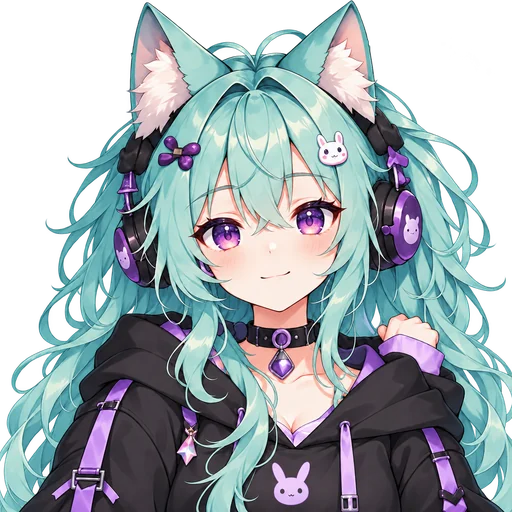
Idle
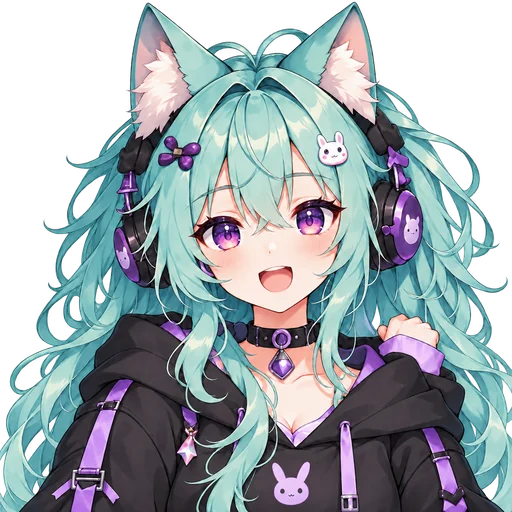
Talking
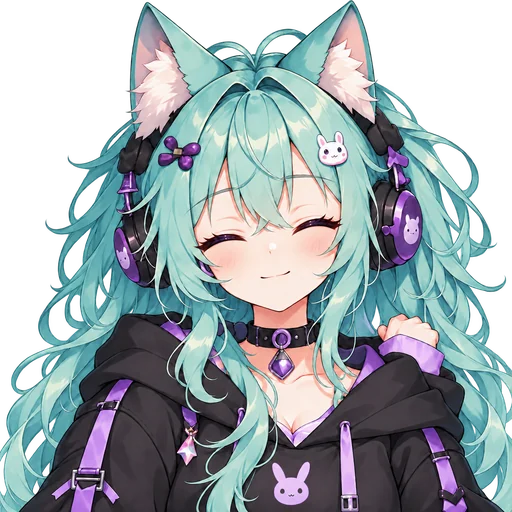
Blinking
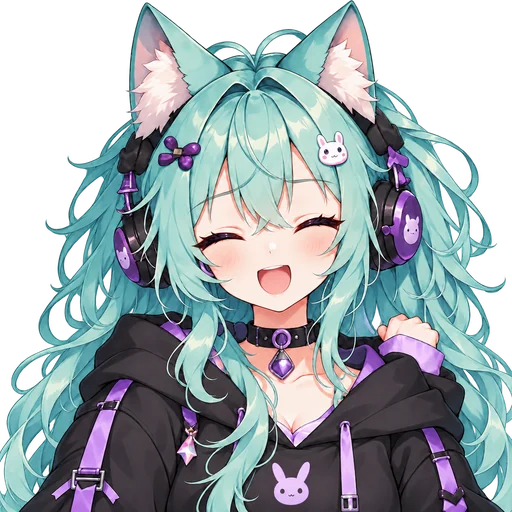
Blink + talk
Where do the two frames come from?
You can draw them, recolor a free base, commission an artist, or generate them with AI. If you can't draw and want an original character today, generate one. If your budget is zero, start from a base. If you want a style nobody else has and can wait a few weeks, commission an artist. Whichever you pick, the files follow the same two rules: see-through backgrounds, and every frame the same size and position.
| Way to make it | Cost | Time | You need | Best for |
|---|---|---|---|---|
| Draw them yourself | Free with Krita, or the price of an art app | An afternoon to a few weeks | Drawing skill | Full control over the style |
| Recolor a free PNGTuber base | Free | 15 to 60 minutes | Basic editing | Zero budget, streaming today |
| Commission an artist | About $20 to $200 | One to four weeks | A clear brief | A one-of-a-kind look |
| Generate them with the AI PNGTuber maker | First 4 designs free, then about $2.38 per finished character | 5 to 15 minutes | A one-sentence description | An original character in minutes |
Build a character below and both frames come out correctly by default. If you already have art, use the second tab: its second frame is your picture slightly enlarged, so it pops when you talk. For a mouth that opens, draw that version yourself.
Turn the mic on to check the mouth moves before you go live.
Two transparent PNGs at 1024×1024 — mouth closed and mouth open.
Start from a base
Skin
Hair
Hair color
Eyes
Eye color
Top
Extras
Step 2 — get the frames moving in OBS
This is where most first attempts stall. The short version: add both PNGs to your scene as Image sources, stack them, and install a free plugin that shows the talking frame whenever your microphone goes above a threshold.
The two common approaches are a dedicated PNGTuber plugin, or a general-purpose audio-reactive filter. Either is fine. The setting that matters is the threshold — set it too low and your avatar chatters at your keyboard, too high and it stays shut while you speak.
The step-by-step with the exact source order and settings is on the OBS setup page, including what to do when the mouth flaps at background noise.
Step 3 — the details that make a PNGTuber look good
Getting one working is easy. Getting one that does not look like a first attempt comes down to a handful of small things.
Move something other than the mouth. A tiny lift of the head on the talking frame does more for the illusion than any amount of mouth detail. Purely opening a mouth on a frozen body looks stiff.
Check it at the size viewers see. Your avatar will spend its life about 200 pixels wide in a corner, often on a phone. Fine linework and subtle colors vanish at that size.
Give the threshold ten seconds of care. An avatar that flaps constantly is more distracting than no avatar. Talk normally while adjusting, not in your loud stream voice.
Add expressions later, not now. Extra frames for surprised, laughing or sleepy are a great second-session upgrade. They are also a great way to never finish the first session.


How to make a PNGTuber: common questions
How long does it take to make a PNGTuber?
About five minutes for the character and fifteen for the OBS setup the first time. After you have done it once, swapping in a new design takes a minute.
How much does it cost to make a PNGTuber?
Nothing if you draw it yourself or recolor a free base. Commissioning an artist usually costs about $20 to $200. With the AI generator on this site your first 4 designs are free, and a finished PNGTuber works out to about $2.38 on the $9.90 credit pack.
Do I need to know how to draw?
No. Start from a base and change the colors. Drawing your own is an option, not a requirement, and plenty of established PNGTubers never drew theirs.
How many frames does a PNGTuber need?
Two is the working minimum — mouth closed and mouth open. Extra expression frames are optional and easier to add once the basic setup works.
Can I use my PNGTuber on Twitch or YouTube?
Yes. OBS sends your PNGTuber to whichever platform you stream on, Twitch, YouTube or Kick. For a monetized channel, check the rights: read the license of a base, and ask for commercial use when you commission one. Characters made with the generator on this site can be used commercially.
Can I make a PNGTuber on a phone?
You can make the images on a phone. Streaming software is desktop-only in practice, so the usual pattern is design on a phone and set up on a computer.
How do I become a PNGTuber?
Make the avatar, put it in OBS, and start streaming. There is no registry and no approval step — the avatar is the only thing that separates a PNGTuber from any other streamer.
What if the mouth does not move?
Nine times out of ten the plugin is listening to the wrong audio source or the threshold is too high. The OBS page covers both.